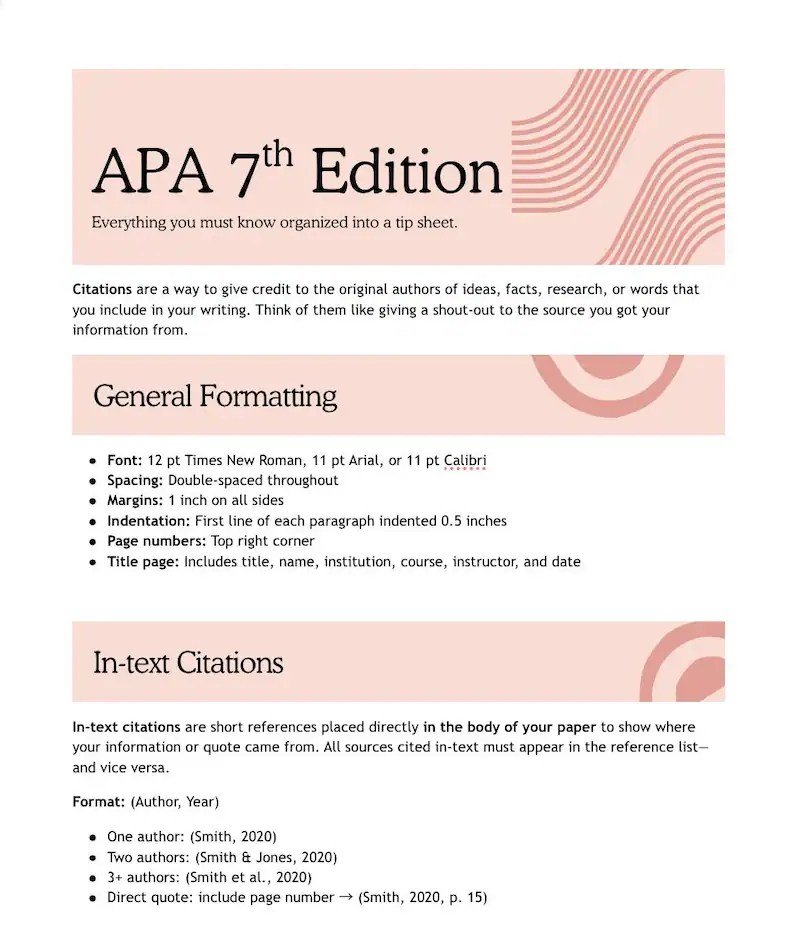
APA 7th Edition Fundamentals for Image Citation Explained: Your Guide to Visual Credibility
In academic and professional writing, images aren't just decorative; they're powerful tools that convey complex information, illustrate concepts, and enhance understanding. But just like any other piece of information you integrate into your work, images—whether they're photographs, charts, maps, or artworks—must be properly attributed. Mastering the APA 7th Edition Fundamentals for Image Citation is crucial not only for academic integrity but also for bolstering your credibility and demonstrating your respect for intellectual property.
Think of it this way: every visual element you use tells a story, and citing it correctly ensures that the original storyteller gets their due credit. This comprehensive guide will walk you through the nuances of APA 7th edition image citation, transforming what might seem like a daunting task into a straightforward process.
At a Glance: Your Quick APA Image Citation Checklist
Before we dive deep, here are the core takeaways for citing images in APA 7th edition:
- Who created it? Always start with the creator's name.
- When was it made? Include the year of creation.
- What is it called? Provide the title (or a description if untitled).
- What kind of image is it? Specify the format in square brackets (e.g., [Photograph], [Painting], [Map]).
- Where did you find it? Include the source location (e.g., website, museum, book).
- Can others find it? Add a URL if accessed online.
- Remember In-Text Citations: Always pair a reference list entry with an in-text citation.
- Figures are Different: Images included within your paper are "Figures" and require specific formatting beyond just a reference entry.
- Copyright Matters: Understand when and how to seek permissions.
Why Visuals Demand Vetting: The Role of Citation
Images grab attention and can make your arguments more compelling, but they also come with a responsibility. Ignoring citation requirements can lead to plagiarism, undermine your academic integrity, and, in some cases, even result in legal issues. The APA 7th edition provides clear, consistent guidelines to help you navigate this landscape, ensuring your visual contributions are both powerful and ethical.
Citation isn't just about avoiding trouble; it's about joining a scholarly conversation. When you cite an image, you're placing it within its broader context, acknowledging its creator, and allowing your readers to explore its origins or related works. It's a hallmark of rigorous research and respectful scholarship.
The Core Blueprint: General APA Image Citation Principles
Every APA image citation, regardless of its source, adheres to a fundamental structure. Once you grasp this core blueprint, adapting it to various scenarios becomes much simpler.
Deconstructing the General Format
At its heart, an APA image citation in the reference list includes these key pieces of information:
Last name, Initials. (Year). Image title [Format]. Site Name. or Museum, Location. URL
Let's break down each component:
- Creator's Last Name, Initials.: This is almost always the artist, photographer, cartographer, or organization responsible for creating the image. If there are multiple creators, list them out.
- Year of Creation (Year): The year the image was created or published. If it's a range (e.g., a painting created over several years), use the range.
- Image Title: The official title of the image. Italicize titles of artworks (e.g., The Starry Night). If the image doesn't have a formal title, you'll provide a brief, descriptive one in square brackets.
- [Format]: Crucially, specify the type of image in square brackets right after the title (e.g., [Painting], [Photograph], [Map], [Infographic], [Chart], [Illustration]). This helps your reader understand the nature of the visual.
- Source Location: This tells your reader where the image can be found.
- For artworks: Name of the museum, gallery, or collection, followed by the city, abbreviated state/province (if applicable), and country.
- For online images: The name of the website or platform where it was found.
- URL (if applicable): If the image was accessed online, provide a direct link to the image or the page where it resides.
A Classic Example: Vincent van Gogh's Masterpiece
To see this in action, consider a world-renowned painting:
Reference Entry Example:
van Gogh, V. (1889). The starry night [Painting]. Museum of Modern Art, New York City, NY, United States. https://www.moma.org/collection/works/79802
In-Text Citation Example:
(van Gogh, 1889)
Notice how the in-text citation is concise, directing your reader to the full details in your reference list. It's the creator's last name and the year of creation, enclosed in parentheses.
Navigating the Digital Canvas: Citing Images Found Online
Most of the images you'll use in your research will likely come from online sources. The principles remain the same, but the "source location" and the addition of a URL become paramount.
The Online Image Citation Format
When citing an image accessed on the internet, your reference entry will follow this specific structure:
Last name, Initials. (Year). Image title [Format]. Site Name. URL
Let's apply this to a common scenario: a photograph found on a platform like Flickr.
Reference Entry Example:
Thompson, M. (2020). Canyon wren [Photograph]. Flickr. https://flic.kr/p/2icfzq4
In-Text Citation Example:
(Thompson, 2020)
The Power of a Direct Link
When citing online images, always strive to include a direct URL to the image itself, or at least to the specific page where the image is displayed. Why? Because the internet is vast and constantly changing. A direct link minimizes the effort for your reader to locate the exact image you're referencing, ensuring transparency and verifiability. Generic links to a website's homepage are rarely helpful.
If you're pulling images from online archives where copyright information is ambiguous or their preferred citation method isn't immediately clear, don't hesitate to contact the archive directly. Most reputable institutions are happy to guide you on proper attribution.
Untangling the Tricky Bits: Handling Missing Information Online
The digital world isn't always perfect, and sometimes crucial pieces of citation information are missing. Don't panic; APA 7th edition offers clear solutions. Your goal is to provide as much information as possible to help your reader find the original source.
1. When the Title is Missing (Untitled Images):
If an image lacks a formal title, create a brief, descriptive title of your own and enclose it in square brackets where the title would normally go.
Reference Entry Example:
[Photograph of a bustling market street in Marrakech]. (2022). Unsplash. https://unsplash.com/photos/xyz123abc
In-Text Citation Example:
([Bustling market street], 2022)
2. When There's No Publication Date:
For images without a clear publication or creation date, use "n.d." (for "no date") in place of the year. It's also good practice, particularly for online sources that might disappear, to include the date you accessed the image.
Reference Entry Example:
Google. (n.d.). [Google Maps map of Utrecht city center]. Retrieved January 10, 2020, from https://goo.gl/maps/keKNQZHZTS7ticwb8
In-Text Citation Example:
(Google, n.d.)
3. When the Creator is Unknown:
If you cannot identify the creator of an image, move the title (or the descriptive title in square brackets if it's untitled) to the author position. If the image is untitled, use the first few words of your descriptive title in the in-text citation.
Reference Entry Example:
[Photograph of a violent confrontation during the Hong Kong protests]. (2019). Twitter. https://twitter.com/xyz11111112
In-Text Citation Example:
([Confrontation during Hong Kong protests], 2019)
Practical Tips for Finding Elusive Information:
- Check "About" or "Info" sections: Many online image platforms or museum websites have detailed information about the artwork.
- Reverse Image Search: Tools like Google Images or TinEye can sometimes help you trace an image back to its original source, which may have the missing details.
- Contact the Source: If the image is from a specific organization or archive, reach out to them.
- Consider Alternatives: If information remains elusive and you cannot confidently cite it, it might be safer to find a different image with clearer attribution details.
From Museum Walls to Print Pages: Citing Offline & Published Images
Not all images live online. You might reference artworks seen in person, maps from an atlas, or infographics from a printed academic journal. The core principles still apply, but the "source location" adapts to reflect the physical or published context.
Citing Artworks Viewed In Person (Museums, Galleries)
For images you've viewed in a museum, gallery, or private collection, the reference entry will specify the institution and its location.
Format:
Last name, Initials. (Year). Image title [Format]. Museum, City, State/Province (if applicable), Country.
Reference Entry Example:
Goya, F. (1819–1823). Saturn devouring his son [Painting]. Museo del Prado, Madrid, Spain.
In-Text Citation Example:
(Goya, 1819–1823)
Note the range for the year, indicating the period over which the work was created.
Citing Images from Print Publications (Books, Journals, Magazines)
If you're using an image that was originally published within a book, journal, or magazine, your citation needs to point to that specific print source. This is common when referencing figures or diagrams from textbooks or research articles.
Format:
Creator, I. (Year). Image title [Format]. In Title of book or journal (Edition/Vol./No., Page range). Publisher. or URL/DOI (if applicable)
Reference Entry Example:
American Psychological Association. (2020). Sample conceptual model [Infographic]. In Publication manual of the American Psychological Association (7th ed., p. 238). https://doi.org/10.1037/0000165-000
In-Text Citation Example:
(American Psychological Association, 2020)
In this case, the APA itself is the creator of the infographic within its manual. The "In" clause specifies where you found the image, much like citing a chapter in an edited book. If the print publication also has an online version with a DOI or URL, include it.
Beyond the Reference List: Incorporating Images as Figures in Your Paper
A common point of confusion is the distinction between a reference list entry and how an image is presented within your paper. When you actually embed an image directly into your text, it's treated as an APA Figure. This requires a specific formatting treatment that goes beyond just listing it in your references.
The Anatomy of an APA Figure
Every figure in your paper, whether it's a photograph, a chart, or a diagram, must include these elements:
- Figure Number: Bolded, appearing directly above the image (e.g., Figure 1). Figures are numbered sequentially throughout your paper.
- Descriptive Title: Italicized, appearing on the next line below the figure number. This title should be concise and clearly explain the figure's content.
- The Image Itself: The visual content.
- Figure Note (Optional, but Recommended for Attributed Images): This appears below the image and is where you provide detailed citation, copyright, and permission information.
Here’s how a typical Figure might look:
Figure 1
The Starry Night
[Image of Van Gogh's The Starry Night]
Note. From The Starry Night, by V. van Gogh, 1889 (https://www.moma.org/collection/works/79802). In the public domain.
Crafting the Figure Note for Attributed Images
The note beneath the figure is crucial for providing the full context and origin. It typically includes:
- Source Citation: Start with "From" or "Adapted from" followed by the title of the image (italicized if it's an artwork or standalone title), the year, and the specific location (e.g., website, museum, book chapter).
- Copyright/Permissions: This is vital. State the copyright holder and any necessary permission statements.
- In the public domain: If the work is old enough to be in the public domain, state that.
- Creative Commons license: Specify the license (e.g., CC BY 4.0).
- Reprinted with permission: If you've obtained specific permission, state "Reprinted with permission." or "Copyright [Year] by [Copyright Holder]. Reprinted with permission."
- Your own work: If you created the image, state "Copyright [Year] by [Your Name]." or "Created by the author."
Example of a Figure Note for an Online Photograph with a Creative Commons License:
Note. From Canyon wren by M. Thompson, 2020 (https://flic.kr/p/2icfzq4). CC BY 2.0.
When to Include Figures in Your List of Figures and Reference Page
- Images you did not create (and are using from an external source):
- They must be formatted as an APA Figure within your paper.
- They must have a full reference entry in your reference list.
- If your paper is extensive and includes many figures, you should create a "List of Figures" after your table of contents, which lists each figure number and its title.
- Images you created yourself (e.g., your own photographs, diagrams you drew):
- They must be formatted as an APA Figure within your paper.
- They do not need a reference list entry because they are your original work.
- They should still be included in your "List of Figures" if you have one. In the figure note, you'd typically state, "Note. Created by the author." or similar.
Remember, even when creating your own visuals, if they incorporate data or elements from other sources, those elements need proper attribution within your figure note or the main text.
The Emerging Frontier: Citing AI-Generated Imagery
As artificial intelligence rapidly evolves, you might find yourself incorporating AI-generated images into your work. The APA 7th edition is adapting to these new forms of content. Generally, AI-generated images are treated much like other images, but with specific considerations for authorship and the tool used. For detailed guidance on this rapidly evolving area, you'll want to explore the latest recommendations on Citing AI images in APA 7. The key is to provide enough information for your reader to understand how the image was created and by what tool.
Common Queries & Quick Clarifications
Let's tackle some frequently asked questions that often arise when citing images.
What if I modified an image? Do I still cite the original?
Absolutely. If you adapt, modify, or excerpt an image from another source, you must still cite the original creator. In your figure note, you'd typically state "Adapted from..." or "Based on..." followed by the original citation and copyright information. This acknowledges that while you've made changes, the core work belongs to someone else.
How do I cite my own photographs or original artwork?
For your original creations, you don't need a reference list entry because you are the creator. However, when you include your photograph as a figure in your paper, you would still format it as a figure with a number and title. In the figure note, simply state, "Note. Created by the author." or "Copyright [Year] by [Your Name]."
Do I need permission for every image I use?
No, but this is a critical area. You generally do not need permission if:
- The image is in the public domain (due to age or explicit release).
- The image is licensed under a Creative Commons license that permits your use (e.g., CC BY). Always check the specific license terms.
- You are using the image for fair use purposes (this is a legal doctrine with specific criteria, primarily for educational, non-commercial, transformative use, and is often debated). When in doubt, seek permission.
- The image is from a stock photo site with a license that covers your intended use.
For most other copyrighted images, especially if you're publishing your work, you will need to obtain explicit permission from the copyright holder. Always include a "Reprinted with permission" statement in your figure note when applicable.
What about stock images or royalty-free images?
Even if an image is "royalty-free" or from a stock site, you still need to cite it. These licenses typically grant you permission to use the image but don't negate the need for attribution. Follow the general online image citation format, treating the stock site as the "Site Name" and crediting the photographer if listed.
Can I use an image in my presentation without a reference list entry?
If you are using images in a presentation (e.g., PowerPoint slides for a class), you still need to attribute them. While a full APA reference list entry might not be required on every slide, you should include a concise citation (creator, year, source) directly on the slide below the image or in a dedicated "Image Credits" slide at the end. For formal academic presentations, a full reference list at the end of the presentation is best practice.
Mastering the Art: Best Practices for Seamless Image Citation
Integrating images effectively and ethically is a skill. Here are some best practices to make the process smoother and your work stronger:
- Start Early, Stay Organized: As you gather images for your research, immediately capture all necessary citation information. Don't wait until the last minute. Keep a running log or use citation management software.
- Consistency is Key: Ensure that all your image citations, both in-text and in your reference list, adhere strictly to APA 7th edition guidelines. Inconsistencies can detract from your professionalism.
- Prioritize Clarity: The ultimate goal of citation is to allow your reader to easily locate and verify the source. If any piece of information seems ambiguous, err on the side of providing more detail.
- Check and Double-Check: Before submitting your work, meticulously review all figure formatting and reference list entries for accuracy. A misplaced comma or missing URL can make a citation ineffective.
- Think Accessibility: Consider how your images and their descriptions contribute to the overall accessibility of your paper. Clear figure titles and descriptive notes are good for all readers.
Your Visual Story, Credibly Told
Incorporating images into your academic or professional writing is a powerful way to enhance your message. By diligently applying the APA 7th Edition Fundamentals for Image Citation, you not only uphold academic integrity but also elevate the quality and trustworthiness of your work. Remember, every citation is a nod of respect to the original creator and a sign of your commitment to rigorous scholarship. So, go forth and illustrate your ideas with confidence, knowing you've given credit where credit is due.